Wednesday, November 5, 2014

How to fix UEFI PXE boot Error

as shown in the screenshot below

0xc0000359.png
 Solution
There are a few solutions to this problem, but basically all involve the same thing, make sure that the task sequence that ‘answers’ your UEFI hardware, contains a 64 bit boot image as shown below

64-bit-boot-wim.png


In general, the task sequence that answers is the last task sequence deployed to the collection that your computer you are booting is a member of.

You can either add the computer in question (computer+mac address) to a collection that has a task sequence deployed to it with a 64bit boot image or re-deploy a task sequence with a 64 bit boot image to the collection that this computer is a member of, or change the current task sequence to use a 64 bit boot wim instead of a x86 bit boot wim.

TiP: If you cannot make a change to any of the UEFI Network deployments then another idea is to use usb or ISO based Standalone or boot media containing the 64bit boot image.

Be aware that changing the architecture of your boot wim may cause some executables to fail to run in Windows PE  as the ‘subsystem’ in WinPE will have changed architecture from 32bit to 64bit.  This also means that you can only install a 64 bit operating system using this boot image.

“To install Windows to an EFI-based computer, you must enable EFI mode in the computer’s firmware and boot with 64-bit pre-installation media. ” – source, Technet.

Once you’ve made the changes above, UEFI network boot a client computer again, and you should see it’s using the boot.wim file (package ID) that you attached to the task sequence, in this case it’s using a 64bit boot wim (P0100002.wim)

UEFI-network-boot.png

as you can see here…

P0100002.png

The end result, is a working UEFI network boot !

UEFI-network-boot-working.png

Monday, November 3, 2014

Create a "Build and Capture" Task Sequence for Windows 8.1

Extract ISO
Download and extract MS provided Windows 8.1 Professional ISO to a network share
P4-2

Add and distribute Install.wim
The only file that we really need from the extracted source above is Install.wim under Sources folder. We will need to add that wim file to ConfigMgr Operating System Images
In the Configuration Manager console, click Software Library. In the Software Library workspace, expand Operating Systems, and then expand Operating System Images . For my convenience, I have created a folder structure as below and you can define your own. After selecting your target folder, click Add Operating System Image on the ribbon.
P4-3
Specify the network UNC path to the extracted install.wim file and click Next.
P4-4
On the General page, add optional version and/or comments and click next
P4-5
On the Summary page, click Next
P4-6
Make sure there is no error on the Completion Page and click Close.
Now distribute this OS image to the DP associated with your target VM. You do not need to distribute it to all your DPs.
With the image selected, click on Distribute content on the ribbon
P4-7
On the General page, click Next
P4-8

On the Content Destination page, click Add and then click Distribution Point. Check the target DP and click OK. Then click Next
P4-9
On the Summary page, click Next and then click Close on the Completion page.

Step 3: Create & Deploy Build and Capture Task Sequence
In the Configuration Manager console, click Software Library. In the Software Libraryworkspace, expand Task Sequence. For my convenience, I have created a folder structure as below and you can define your own. After selecting your target folder, click Create Task Sequence on the ribbon.
P4-10
On the Create New Task Sequence page, select Build and capture a reference operating system image and click next
P4-11
On the Task Sequence information page, specify a Task sequence name and select a boot image.
P4-12
On the Install Windows page, click browse and select the Microsoft provided image that we imported and distributed in the previous step. There is only one image to choose. I have specified KMS key as my product key. You can look at KMS client setup keys at:http://technet.microsoft.com/en-us/library/jj612867.aspx
P4-13
On the Configure Network page, we will choose to add this machine to a workgroup (remember this is just a capture TS and not the one that will go on all our user machines). Click Next
P4-14
On the Install Configuration Manager Client page, click Next
P4-15
On the Include Updates page, we will stick with the default option to not install any.
P4-16
On the Install Applications page, add your Tier 0 apps and click Next. If you added your applications as packages you will have to add them to the task sequence later
P4-17

On the System Preparation page click next.
On the Image Properties page add optional image properties
P4-18
On the Capture Image page, specify the network UNC path of the file where the capture image will be saved. Click Set to specify a domain account which has access to write to that share. Click next.
P4-19
On the Summary page click next and then close the completion page.
Task sequences are deployed to collections, I have created a collection to target this TS with an Include Collections membership rule.
P4-20
Our new VM will not be in CM database and hence will see the TS advertised. To deploy the TS, select the TS and click Deploy on the ribbon.
P4-21
On the General page browse and select your target collection and click Next
P4-22
On the Deployment Settings page, select Available as the purpose and we will make this TS available to Only media and PXE. Click Next
P4-23
On the Scheduling page, select the deployment availability time appropriately. Deployment expiration is optional. Click Next
P4-24
On the User Experience ,Alerts  Distribution Points and Summary pages click next.
When you see the completion page, make sure there are no errors and click Close.
This will create a basic build of Windows 8.1 and will capture it with your settings, You can edit the task and add programs or updates

Thursday, October 23, 2014

Deploy Adobe Reader XI with SCCM 2012 R2


To deploy Adobe Reader with SCCM 2012 you can download and extract the latest Adobe Reader .EXE to get to the system files ( .msi, .ini, .msp etc..) using the method below.
From the command prompt: AdbeRdr11004_en_US.exe -nos_ne
Extract Reader EXE to MSI
The following screen will appear.. Adobe Reader XI (11.0.04) – Setup
Extracting Adobe Files
In this case the Adobe Reader EXE (AdbeRdr11007_en_US.exe)  was extracted on a Windows 7 PC and the extracted files can be found in C:\ProgramData\Adobe\Setup.
The sub-directory under Setup in my case was {AC76BA86-7AD7-1033-7B44-AB0000000001} which is also the GUID or Product ID for this particular MSI.
Now that the Updated Adobe Reader Files are extracted, you can create a SCCM 2012 Adobe Reader Application or create a Package to deploy the Adobe Reader .MSP directly.
Sccm Adobe Reader
 The extracted directory name in this case will also be the uninstall GUID (shown below) when you create your Adobe Reader 11.0.07 application with Configuration Manager 2012.
uninstall GUID
The extracted Adobe Reader files are shown below.
Adobe Reader Extracted Files

Create a MST transform
1. Download Adobe Customization Wizard XI from here.
2. Install the application and launch it when done.
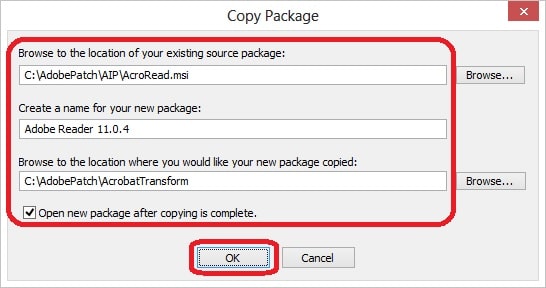
3. Click on File -> Copy Package.
4. Enter the information as in the picture below:
48_9
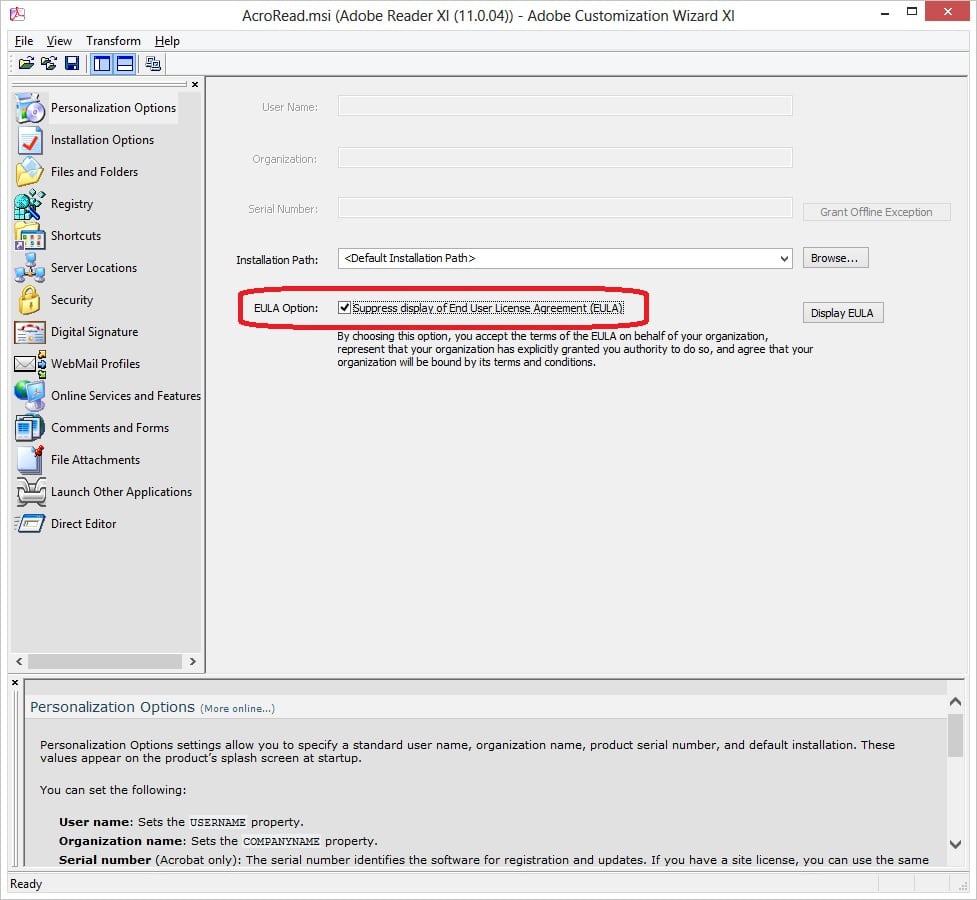
5. In the left pane on the Personalization Options, check EULA Option: Suppress display of End User License Agreement (EULA).
48_10
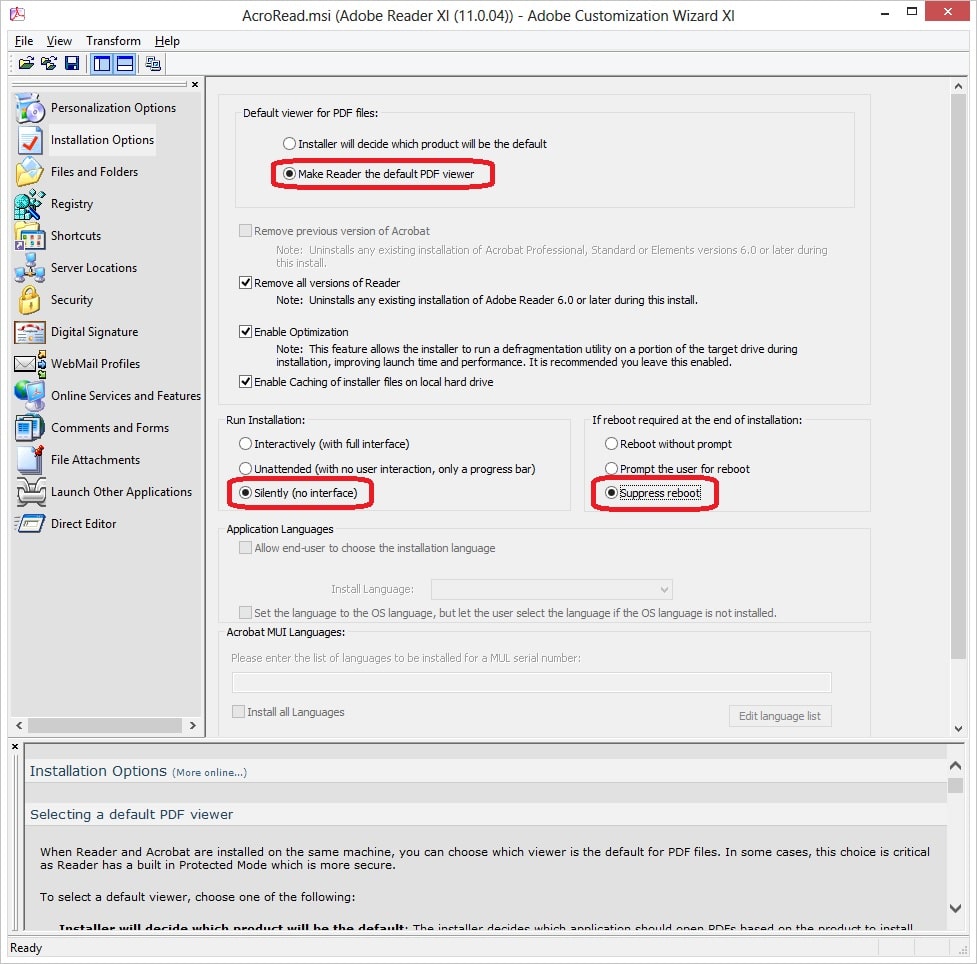
6.  On the Installation Options page, select Make Reader the default PDF ViewerSilently (no interface) and Suppress reboot.
48_11
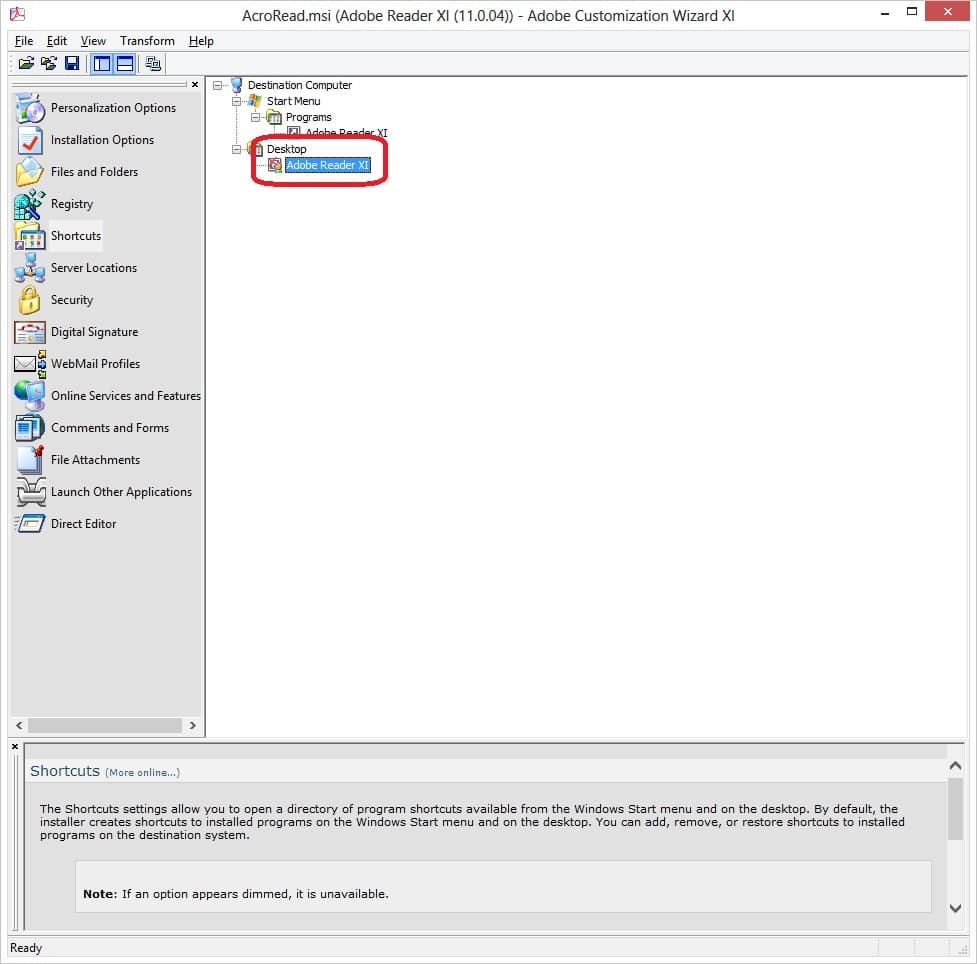
7. On the Shortcuts page, remove Adobe Reader XI under Desktop.
48_12
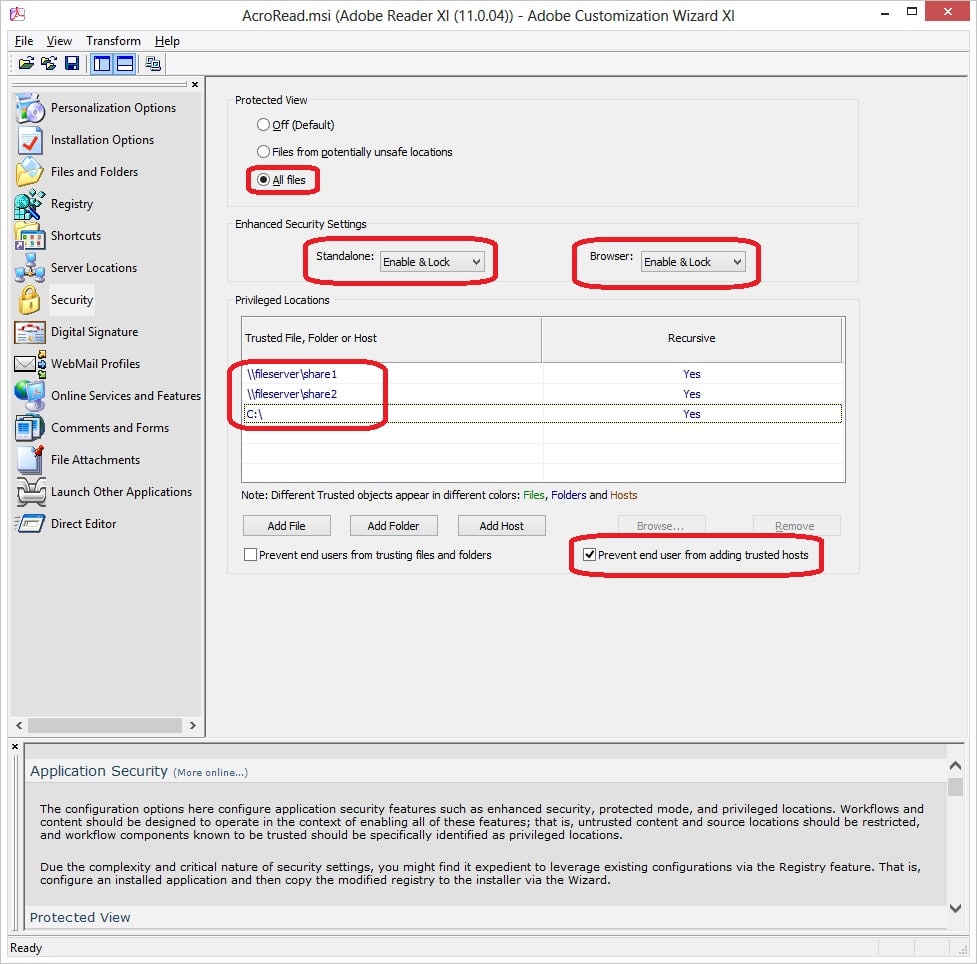
8. On the Security page under Protected View, select All files. Under Enhanced Security Settings, select Enable & Lock for both Standalone and Browser. Under Privileged Locations, add the network shares your company stores common data. You can also add C:\ and other local drives. Check the box next to Prevent end user from adding trusted hosts. See the picture below for how I’d recommend to tighten the security in Adobe Reader. Remember though, these security settings may not apply in your environment. Perform thorough tests before deploying the application.
48_13
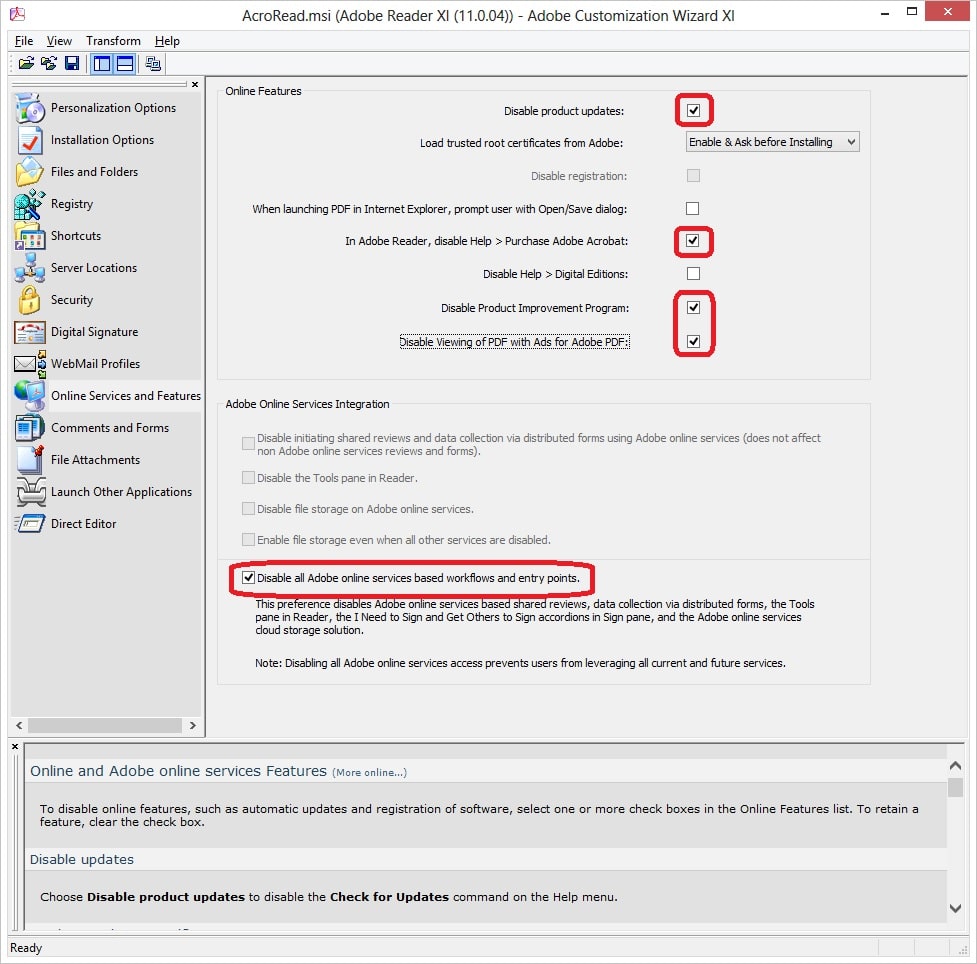
9. On the Online Services and Features page, check the following boxes:
  • Disable product updates
  • In Adobe Reader, disable Help > Purchase Adobe Acrobat
  • Disable Product Improvement Program
  • Disable Viewing of PDF with Ads for Adobe PDF
  • Disable all Adobe online services based workflows and entry points
48_14
10. Click File -> Save Package.
When creating your package just select the Setup.exe file which will take care of the rest, the only issue I had so far is that it wouldn't uninstall Adobe Reader X, but with the use of a batch file I was able to accomplish this.


Monday, February 13, 2012

Syrian President's Email Hacked... His Password Was 12345


Well, this is rather incredible. With the news that Anonymous hacked the offices of the Syrian President and dumped a ton of emails online... comes the news that the hack was insanely easy. Why? Because, apparently, the password was 12345. No joke. Of course, that's considered one of the worst passwords of all time. And, as pointed out by Lauren Weinstein, this is the exact same password that was immortalized by Dark Helmet (the original one, rather than our local Techdirt hero) as being the stupidest password he's ever heard -- and the "kind of thing an idiot would have on his luggage!"


Wednesday, November 16, 2011

How to Set Up Gmail, Google Calendar, and Google Contacts (Properly) on iOS

The iPhone is a fantastic phone, but if you're a heavy user of Google services, it can be a little confusing to set up your Gmail, Google Calendar, and Google Contacts to sync with iOS. The default method's no good. Here's the better way to do it.
You can get all your Google services syncing (complete with push sync—that is, messages push to your phone as soon as you receive them) with iOS by setting up just one account. The trick is to choose Microsoft Exchange at the prompt instead of Gmail. This will give you access not only to your Gmail, but your calendars and contacts, and they will all sync directly to your phone—when you add a contact in Gmail or edit an event on Google Calendar, you'll see it show up on your phone without having to sync anything. To set it up:


  1. Open up the Settings app on your iOS device and go to the "Mail, Contacts, Calendars" section. Hit "Add Account".
  2. From there, choose Microsoft Exchange as the type of account (again, don't choose Gmail).
  3. Type in your Gmail address under Email. Leave the Domain field blank and enter your full Gmail address under Username (including the @gmail.com, @googlemail.com, or other suffix). Type in your password and give it any description you like. Mine's just called "Gmail".
  4. Press the Next button at the top of the screen. It should pop up a message saying Unable to Verify Certificate—if it does, just hit cancel. Then, type m.google.com in the new "Server" box that shows up at the top of the screen. Then tap Next.

From there, you should be all set. You can turn on Mail, Contact, and Calendar syncing from the account settings page that shows up. Note that pressing the trash can icon in the Mail app will archive a message, not delete it completely. If you want to delete it, you can hit the folder icon and choose Trash from the menu to move it to the trash. For more information on setting up Gmail with iOS, check out Google's help page on the subject.

Monday, June 20, 2011

The EASY ONE-STOP place to grab the best Windows freeware

Most popular applications for 2011.
For XP, Vista, Windows 7

All of these applications are Reliable, and WORK GREAT in most any system.
This software is FREE...and ALL are malware/spyware CLEAN...
Links are directly to the developers/providers site so you can check out all the details and features of an application.
You ALWAYS get the up-to-date version


Optional items or toolbars are sometimes auto-selected in freeware, so be sure to deselect these during your software installation..


**MUST Have apps. for ANY OS**

Adobe Reader; Flash Player; AIR; Shockwave Player; http://www.adobe.com/downloads/
CCLeaner; http://www.piriform.com/ccleaner/download
DirectX End-User Runtime Web Installer; http://www.microsoft.com/downloads/e...displaylang=en
Java; http://www.java.com/en/download/index.jsp


_________________________

1) Anti-Virus/Security;
Avast Free AV; http://www.avast.com/free-antivirus-download
AVG Free; http://download.cnet.com/AVG-Anti-Vi...dlPid=11014801
Avira Free; http://www.avira.com/en/avira-free-antivirus
Comodo; http://personalfirewall.comodo.com/free-download.html
Microsoft Security Essentials; http://www.microsoft.com/en-us/secur...s/default.aspx
Panda USB Vaccine; (USB anti-malware) http://www.pandasecurity.com/homeuse...ds/usbvaccine/
SpywareBlaster; http://www.javacoolsoftware.com/
Sandboxie;http://www.sandboxie.com/index.php?DownloadSandboxie

2) Audio;
Audacity; http://audacity.sourceforge.net/
EAC-Exact Audio Copy; http://www.exactaudiocopy.de/
FreeCommander; http://www.freecommander.com/index.htm
Power Sound Editor Free; http://www.free-sound-editor.com/
Rename Master; http://www.joejoesoft.com/cms/showpage.php?cid=108
Songbird; http://getsongbird.com/product/

3) Browsers;
Avant Browser; http://www.avantbrowser.com/default.aspx?uil=en-US
Firefox; http://www.mozilla.com/en-US/firefox/new/Mozbackup; http://mozbackup.jasnapaka.com/
Google Chrome; http://www.google.com/chrome/index.h...&utm_medium=ha
kylo; http://kylo.tv/
Opera; http://www.opera.com/
RockMelt (beta); http://www.rockmelt.com/
SpaceTime-3D Browser/search; http://www.spacetime.com/home.php

4) CD/DVD Burning & Tools;
bitRipper- DVD to AVI software; http://www.bitripper.com/
CDBurnerXP; http://cdburnerxp.se/
BurnAware Free; http://www.burnaware.com/burnaware_free.html
DeepBurner; http://www.deepburner.com/index.php
DVDShrink; http://www.dvdshrink.org/
Free Easy CD DVD Burner; http://www.koyotesoft.com/indexEn.html
Free ISO Burner; http://www.freeisoburner.com/
ImgBurn; http://www.imgburn.com/
Infra Recorder;http://infrarecorder.org/
Nero Kwik Media; http://www.nero.com/enu/downloads-nbl-free.php

5) Codec packs;
CCCP; http://www.cccp-project.net/wiki/ind...itle=Main_Page
K-Lite Codec pack; http://www.codecguide.com/download_kl.htm
Shark007; http://shark007.net/win7codecs.html

6) CPU, Hardware & Memory testing tools;
CPUID; http://www.cpuid.com/
CoreTemp; http://www.alcpu.com/CoreTemp/
Disk Benchmark; http://www.attotech.com/products/pro...Disk_Benchmark
IntelBurn Test; http://majorgeeks.com/IntelBurnTest_d5987.html
Memtest86; http://www.memtest.org/
Prime95; http://www.mersenne.org/
RealTemp; http://www.techpowerup.com/realtemp/
SIW - System Information for Windows; http://www.gtopala.com/

7) Data & File Recovery - In order of user ratings…
Recuva; http://www.piriform.com/recuva/features
Mini-Tool; http://www.powerdatarecovery.com/
EASEUS; http://www.easeus.com/product.htm
PC Inspector; http://www.pcinspector.de/default.htm?language=1
TestDisc; http://www.cgsecurity.org/wiki/TestDisk_Download
PhotoRec; http://www.cgsecurity.org/wiki/PhotoRec
Restoration; http://www.aumha.org/a/recover.php

8) Encryption;
TrueCrypt; http://www.truecrypt.org/downloads
AxCrypt; http://www.axantum.com/axcrypt/
dsCrypt; http://members.ozemail.com.au/~nulif...ezip/freeware/
Pismo File Mount; http://www.pismotechnic.com/pfm/ap/

9) Extraction and Compression;
7zip; http://www.7-zip.org/
ExtractNow; http://www.extractnow.com/
HaoZip; http://www.haozip.com/Eng/index_en.htm
IZArc; http://www.izarc.org/
PeaZip; http://www.peazip.org/
Universal Extractor; http://legroom.net/software/uniextract
Winrar; http://www.win-rar.com/download.html

_________________________
10) File transfer & sharing;
JDownloader; http://jdownloader.org/
Free Download Manager; http://www.freedownloadmanager.org/
Live SkyDrive-(25GB Windows cloud file share); http://windows.microsoft.com/en-us/w...e-file-storage
PeerBlock; http://www.peerblock.com/
Shareaza; http://shareaza.sourceforge.net/
Tixati; (+1) http://www.tixati.com/
uTorrent; http://www.utorrent.com/
---------------------------
a) FTP Clients*
FileZilla; http://filezilla-project.org/
PuTTY; http://www.chiark.greenend.org.uk/~sgtatham/putty/
WinSCP; http://winscp.net/eng/docs/introduction
_________________________

11) Hash tools;
WinMD5Free; http://www.winmd5.com/download/winmd5free.zip
HashTab; http://www.implbits.com/Products/HashTab.aspx
HashMyFiles; http://www.nirsoft.net/utils/hash_my_files.html
HashCheck Shell Extension; http://code.kliu.org/hashcheck/
Marxio File Checksum Verifier; http://download.cnet.com/Marxio-File...b_content;main
Microsoft File Checksum Integrity Verifier; http://www.microsoft.com/downloads/e...3-7365c1686c08
MD5summer (Windows MD5 Sum generator); http://download.cnet.com/MD5summer/3...-10050856.html

_________________________
12) Home & OFFICE;
CSVed; http://csved.sjfrancke.nl/index.html
Everything Search: http://www.voidtools.com/
FileLocator Lite; http://www.mythicsoft.com/Page.aspx?...&page=download
FreeOCR; http://www.paperfile.net/
Microsoft Mathematics; http://www.microsoft.com/education/t...atics_4.0.aspx
NFOPad; http://thd.dyndns.org/s_nfopad.php
Q10; http://www.baara.com/q10/
SimpleOCR; http://www.simpleocr.com/
Speckie-Spell check for IE; also for IE9 http://www.speckie.com/home/
Stickies - Any Windows OS; http://www.zhornsoftware.co.uk/stickies/
Total Commander (file manager); http://www.ghisler.com/index.htm
Wunderlist (great task manager); http://www.6wunderkinder.com/wunderlist/
----------------------------
a) MICROSOFT Office Alternatives*
LibreOffice; http://www.libreoffice.org/
OpenOffice.org; http://www.openoffice.org/
----------------------------
b) PDF readers/writers*
Bullzip PDF Printer; http://www.bullzip.com/products/pdf/info.php#download
CutePDF; http://www.cutepdf.com/
doPDF; http://www.dopdf.com/
Foxit PDF reader; http://www.foxitsoftware.com/pdf/reader/
Nitro PDF Reader; http://www.nitroreader.com/
PDFill PDF Editor; http://www.pdfill.com/download.html
PDF Creator; http://www.pdfforge.org/
PDF-XChange; http://www.tracker-software.com/prod...xchange-viewer
Sumatra PDF; http://blog.kowalczyk.info/software/...df-reader.html
_________________________

13) Image & Photo Editing;
Artweaver; http://www.artweaver.de/home-en/
GIMP; http://www.gimp.org/
IrfanView; http://www.irfanview.com/
Inkscape-vector graphics editor; http://inkscape.org/
Paint.NET; http://www.getpaint.net/download.html
PhotoFiltre; http://photofiltre.free.fr/frames_en.htm
PhotoWipe; (magic eraser) http://www.hanovsolutions.com/?prod=PhotoWipe
Picasa; http://picasa.google.com/#utm_campai...tm_term=picasa
-------------------------
a) Creative tools*
AniFX- cursor creator; http://icofx.ro/anifx/index.html
GIF Viewer; http://www.gifviewer.org/
IcoFX- icon creator; http://icofx.ro/
PicPick; http://www.picpick.org/
PowerBullet Presenter; http://powerbullet.com/info.php

14) ISO tools;
Alchohol 52% Free Edition; http://www.free-downloads.net/progra...utmk=233181854
Daemon Tools; http://www.daemon-tools.cc/eng/downloads
ei.cfg removal tool; http://code.kliu.org/misc/win7utils/
MagicDisc; http://www.magiciso.com/tutorials/mi...c-overview.htm
Virtual CloneDrive http://www.slysoft.com/en/virtual-clonedrive.html
Windows 7 ISO Image Edition Switcher; http://code.kliu.org/misc/win7utils/
-------------------------
(Free use up to 300mb file size)
Magic ISO; http://www.magiciso.com/
Power ISO; http://www.poweriso.com/
Ultra ISO; http://www.ezbsystems.com/ultraiso/download.htm
_________________________

15) Malware detection and removal;
Malwarebytes; http://www.malwarebytes.org/mbam.php
Ad-Aware; http://www.lavasoft.com/products/ad_aware.php
Emsisoft Anti-Malware; http://www.emsisoft.com/en/software/antimalware/
GMER; http://www.gmer.net/
HijackThis; http://free.antivirus.com/hijackthis/
Kaspersky Online Scanner; http://www.kaspersky.com.my/virusscanner.php
RKill; http://www.bleepingcomputer.com/forums/topic308364.html
Sophos Anti-Rootkit; http://www.sophos.com/en-us/products.../download.aspx
Spybot Search and Destroy; http://www.safer-networking.org/en/download/index.html
SUPERAntiSpyware; http://www.superantispyware.com/index.html
Trend Micro HouseCall - Free Online Virus Scan; http://housecall.trendmicro.com/

_________________________
16) Media Players & Centers;
AIMP; http://www.aimp.ru/
GOM Player; http://www.gomlab.com/eng/GMP_download.html
KMPlayer; http://www.kmplayer.com/korea/index.php
Media Player Classic; http://mpc-hc.sourceforge.net/
Kantaris; http://kantaris.org/
QuickTime; http://www.apple.com/quicktime/download/
UMPlayer; http://www.umplayer.com/
VLC Player;http://www.videolan.org/vlc/
WINAMP; http://www.winamp.com/
Zune; http://www.zune.net/en-us/products/s...ad/default.htm Offline installer; http://www.microsoft.com/downloads/e...displaylang=en
-------------------------
a) Media Centers*
Ashampoo ClipFinder HD- Online video finder/viewer; https://www.ashampoo.com/en/usd/pin/...-ClipFinder-HD
Boxee; http://www.boxee.tv/
Hulu-desktop; http://www.hulu.com/labs/hulu-desktop
MediaPortal; http://www.team-mediaportal.com/
XBMC- player and media center app.; http://xbmc.org/about/
_________________________

17) Programming;
Code::Blocks; http://www.codeblocks.org/
ConTEXT; http://www.contexteditor.org/
Crimson Editor; http://www.crimsoneditor.com/
Flashdevelop;http://osflash.org/flashdevelop
GetDiz; http://www.outertech.com/en/notepad-replacement
HxD; http://mh-nexus.de/en/downloads.php?product=HxD
Notepad++; http://notepad-plus-plus.org/
Programmer's Notepad; http://www.pnotepad.org/
SharpDevelop; http://www.icsharpcode.net/OpenSource/SD/
Win32Pad; http://winscp.net/eng/docs/introduction

18) Remote access and remote support;
TeamViewer; http://www.teamviewer.com/en/download/index.aspx
Join.me; https://join.me/
LogMeIn; http://help.logmein.com/SelfServiceDownloads
Mikogo; http://www.mikogo.com/product/what-is-mikogo/

_________________________
19) System Tools;
Advanced SystemCare Free (all-in-one); http://www.iobit.com/advancedsystemcareper.html
EasyBCD; http://neosmart.net/dl.php?id=1
GLARY All-In-One; http://www.glaryutilities.com/
Hiren's BootCD; http://www.hirensbootcd.org/download/
Inno Setup (installer); http://www.jrsoftware.org/isinfo.php
Kiwi-program monitor/tweak; http://drinkprog.com/kiwi/
MGA Diagnostic tool; http://go.microsoft.com/fwlink/?linkid=52012
.NET Framework- All versions; http://www.askvg.com/what-is-microso...rsions-inside/
pserv (pserv.cpl replacement); http://p-nand-q.com/gtools/pserv3.html
System Nucleus-tweak and monitor; http://www.spencerberus.com/projects.aspx
TweakNow PowerPack; http://tweaknow.com/powerPack.php
TweakUI for XP;http://download.cnet.com/Tweak-UI/30...-10002117.html
Ultimate Windows Tweaker; http://www.thewindowsclub.com/ultima...ista#more-1957
Unlocker; http://www.emptyloop.com/unlocker/
Unknown Device Identifier; http://www.zhangduo.com/udi.html
WinMend Auto Shutdown; http://www.winmend.com/auto-shutdown/
-------------------------
a) Defragmentation*
Auslogics Defrag; http://www.auslogics.com/en/software/disk-defrag/
Defraggler; http://www.piriform.com/defraggler
MyDefrag; http://www.mydefrag.com/
O&O Defrag; http://www.oo-software.com/free/en/
Smart Defrag;http://download.cnet.com/Smart-Defra...nt;contentMain
-------------------------
b) Disk Utilities*
Active KillDisc; http://www.killdisk.com/downloadfree.htm
CrystalDiskInfo-HDD/SSD utility; http://crystalmark.info/software/Cry...o/index-e.html
DBAN; http://www.dban.org/about
GParted; http://gparted.sourceforge.net/download.php
HotSwap! http://mt-naka.com/hotswap/index_enu.htm
HP USB Disk Storage Format Tool; http://download.cnet.com/HP-USB-Disk...-10974082.html
NoDrives Manager (hide windows drives); http://nodrvman.sourceforge.net/
-------------------------
c) DOCKS for Windows*
ObjectDock; http://www.stardock.com/products/objectdock/ ...+1 
Nexus by Winstep; http://www.winstep.net/index.asp
XWindows Dock http://xwdock.aqua-soft.org/
Ultimate Docks collection; http://www.askvg.com/ultimate-collec...s-for-windows/
-------------------------
d) Driver tools*
Double Driver; View, backup and restore Windows drivers. http://www.boozet.org/download.htm
Driver Genius-Driver backup tool; Free to try (Drivers download disabled) http://www.driver-soft.com/
Driver Magician; http://www.drivermagician.com/Lite.htm
DriverMax; (requires free registration for full features) http://www.drivermax.com/index.htm
-------------------------
e) File Splitter*
FFSJ-file splitter/joiner; http://www.jaist.ac.jp/~hoangle/filesj/
Free File Splitter; http://www.filesplitter.org/
GSplit; http://www.gdgsoft.com/gsplit/index.aspx
HJsplit; http://www.hjsplit.org/
-------------------------
f) Password Managers*
KeePass Password Safe; http://keepass.info/
LastPass; https://lastpass.com/
Password Safe; http://passwordsafe.sourceforge.net/
-------------------------
g) Startup Managers*
Autoruns for Windows (startup manager); http://technet.microsoft.com/en-us/s...rnals/bb963902
BootVis (XP startup manager);http://www.majorgeeks.com/download.php?det=664
Mike Lin's Startup Control Panel; http://www.mlin.net/StartupCPL.shtml
Startup Delayer; http://www.r2.com.au/page/products/show/startdelay
-------------------------
h) Uninstallers*
IObit Uninstaller; http://www.iobit.com/advanceduninstaller.html
Revo Uninstaller free version; http://www.revouninstaller.com/revo_..._download.html
-------------------------
i) Virtualization*
Paragon GO Virtual; http://www.paragon-software.com/home/go-virtual/
VirtualBox; http://www.virtualbox.org/
Virtual PC/XP Mode; Windows 7 Pro & Ult. only- http://www.microsoft.com/windows/virtual-pc/
VMware software trial evaluation; https://www.vmware.com/tryvmware/?p=default
_________________________

20) Video Downloaders and Converters;
Any Video Converter; http://www.any-video-converter.com/p...or_video_free/
CamStudio; http://camstudio.org/
Feemake Video Downloader(40+ sites support); http://www.freemake.com/free_video_downloader/
Freemake Video Converter (200+ Input Formats); http://www.freemake.com/free_video_converter/
Hamster Free Video Converter; http://videoconverter.hamstersoft.com/en/
Handbrake; http://handbrake.fr/
iMedia Converter; http://www.iskysoft.com/imedia-converter-windows.html
MediaCoder; http://www.mediacoderhq.com/
Orbit Downloader; http://www.orbitdownloader.com/
WinX DVD Ripper; http://www.winxdvd.com/dvd-ripper/

21) Other apps.
DOSBox- DOS emulator; http://www.dosbox.com/information.php?page=0
FREEOPENER (multi-file opener/player); http://www.freeopener.com/
GameSave Manager; http://gsm.duncsweb.com/
Mozilla Thunderbird-multiple email client;http://www.mozillamessaging.com/en-US/thunderbird/
Open++ (context menu); http://download.cnet.com/Open/3000-2094_4-10743609.html
Path Copy; http://download.cnet.com/Path-Copy/3...4-1487176.html
Skype; http://www.skype.com/intl/en-us/home
TeraCopy; (faster copier) http://www.codesector.com/teracopy.php
Tweaks.com Logon Changer for Windows 7; http://tweaks.com/software/tweakslogon/
World Clock; http://www.wimsprograms.com/programs.html#wclock30
UNetbootin-Linux; http://unetbootin.sourceforge.net/


Our DATA is always most important.

Some options below are not FREE, but compared to their low cost they are invaluable…!

Backup, Backup, Backup…


22) Data backup Only;
Paid- Continuous, auto backup and 24/7 secure and encrypted.
Access to your files from any PC in the world for less than $5 a month.
Unlimited storage. 15 day risk-free trial…

Carbonite; http://www.carbonite.com/
----------------------------
Free data backup (up to 2GB)
Availability from anywhere-sync and sharing
Pro 50 (50GB max.) for $9.99 a month
Dropbox;
http://www.dropbox.com/
----------------------------
Free data backup (up to 2GB)
Simple online backup for only $5.99 a month (up to 50GB max.)

MOZY; https://mozy.com/home/

23) Image and Data backup;
-----------------------------
FREE Backup
Comodo Backup; http://www.comodo.com/home/data-stor...odo-backup.php
EASEUS Todo Backup Home; http://www.todo-backup.com/products/...p-software.htm
GFI Backup 2011; http://www.gfi.com/pages/backup-freeware.asp
Macrium Reflect (free version imaging only); http://www.macrium.com/reflectfree.asp
Paragon Backup and Recovery 2011; http://www.paragon-software.com/home/br-free/
---------------------------------------
PAID backup
Acronis True Image; http://www.acronis.com/
Norton Ghost; http://us.norton.com/ghost/